
Set up Signet
Run setup
Section titled “Run setup”signet setupSetup creates a local workspace when needed, starts or reaches its daemon, and opens a guided modal in the dashboard. Running it again resumes onboarding without resetting your existing configuration. signet configure and signet config open the same flow.
The onboarding flow
Section titled “The onboarding flow”- Welcome explains what memory carries between conversations.
- Agents offers Claude Code, Codex, Hermes Agent, OpenCode, OpenClaw, Gemini CLI, Pi, Oh My Pi, Kimi, Muse Code, and ForgeCode. OpenClaw requires its Signet plugin package from CLI setup before connecting here. You may connect an agent later.
- Connection signs in to a provider, stores an API key, or connects a local model. The screen also asks whether to enable Dreaming, defaulting on for a fresh workspace. Dreaming remains enabled but unavailable until a working provider is connected and tested. Test and enable memory saves the model configuration, checks a real response, and starts automatic processing. Saved credentials can be replaced or signed in again. Failed saves or tests show an error; Set up later keeps the Dreaming choice but does not run inference or start automatic processing. Existing frozen or shadow controls are respected.
- Bring your context optionally connects an Obsidian vault or imports files and transcript exports. You can add multiple sources. Indexing and import jobs may continue in the background; their reported state is not a claim that semantic processing has completed. Sources provides progress, errors, retry, and removal.
- First memory saves a private note under your active agent, then retrieves that same note through scoped search.
- Ready reports the checks that actually completed. Start a new conversation in your agent to check its integration.
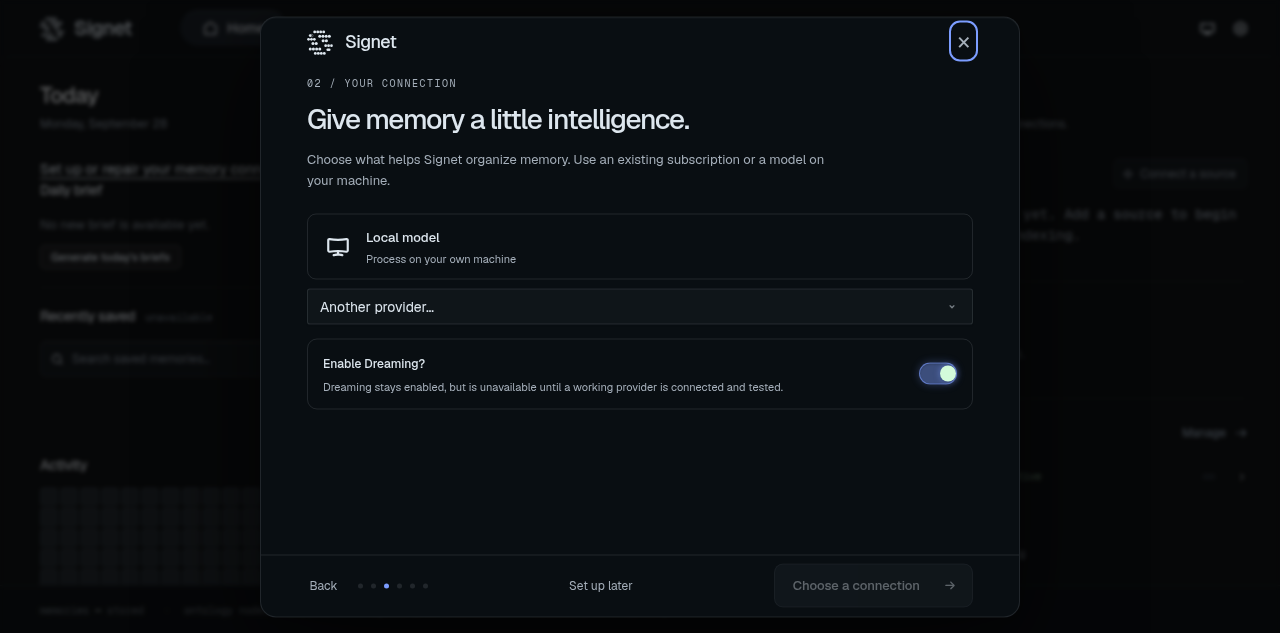
Closing and reopening remembers the UI checkpoint in this browser, but rechecks the model connection. Credentials are stored by the daemon, never in the checkpoint. If browser storage is unavailable, the workspace is still preserved.
Fresh interactive setup leaves identity management off and telemetry disabled. Dreaming defaults on and is offered as a choice beside provider/model setup; without a working provider it remains enabled but unavailable. Automatic processing starts only after the explicit provider test and enable action. Existing workspaces keep their settings. Sources and advanced configuration remain available after onboarding.
For unattended systems, use the non-interactive setup reference. JSON plans and flags still use the CLI’s validated setup path; the modal requests existing daemon operations rather than creating a second plan executor. Browser sign-in replaces the retired extractionConnect plan field, which now fails validation.
Identity modes and presets
Section titled “Identity modes and presets”Identity management controls Signet-owned prompt files. It does not change the memory database or recall features.
- Off: Signet does not create, inject, or sync managed identity files. Your harness-native instructions remain authoritative.
- Minimal: normal startup loads
AGENTS.md;DREAMING.mdis available only to Dreaming sessions. - Hermes: uses
SOUL.mdas primary identity alongsideAGENTS.mdproject context. - OpenClaw: uses the richer AGENTS, SOUL, IDENTITY, USER, and MEMORY identity stack plus special-session prompts.
- Custom: starts from Minimal and lets you choose startup files explicitly.
Do not copy a fixed workspace tree into a deployment guide. Setup creates agent.yaml, the memory database, and only the identity files selected by the chosen mode and preset. Selected harnesses may create or update their own integration files outside the workspace.
Check and recover
Section titled “Check and recover”signet statussignet setupIf a browser cannot open, setup prints the dashboard URL with #setup. A remote daemon must already be reachable; local agent connections and Obsidian paths refer to its machine. Use the CLI on your agent’s machine to configure a remote integration.
A partially written agent integration can be retried: the same connector reconciles its files. Failed configuration saves and connection tests are shown in the modal. A saved memory is not saved again merely because recall is still pending. Inspect or remove it in Memory.
Headless setup retains identity presets, network options, Git protection, roster creation, and explicit source flags. Use --non-interactive when supplying configuration changes to an existing workspace; interactive setup will not silently apply those flags. See CLI environment and exit codes for workspace selection.
Source checkouts
Section titled “Source checkouts”Desktop source builds require Bun 1.4.2 or newer. Before syncing source or
installing dependencies, signet desktop build and signet desktop install
check the installed Bun version. In an interactive terminal, an older version
prompts you to run bun upgrade --stable; declining stops the command. The
command checks the version again after upgrading. For package-manager installs
of Bun, decline and upgrade through that package manager. In a non-interactive
terminal, upgrade Bun manually before retrying. --skip-build installs an
existing artifact without requiring Bun.
Setup, signet workspace set, and the workspace layout upgrade do not clone
the Signet repository. Saving and recalling memories use the installed
application. signet sync and application updates maintain an existing
workspace checkout but do not create one.
signet desktop build or signet desktop install explicitly creates the managed
checkout when needed for a source build. Contributors can also clone the repository
and pass --repo to the desktop command. Generated build output does not block
managed default-branch checkout updates. Real local source changes on that checkout
are preserved in a named Git stash when an update is needed, remain parked after
success, and the command prints the exact stash and restore command. If the
checkout is already current, local changes remain in place. Explicit
--repo builds use that checkout without managed source synchronization. Other
branches and unresolved merge conflicts remain untouched and stop the managed
update. If a managed desktop checkout was removed, rerun signet desktop install
to restore its source build path before the next automatic desktop update.
The source-built desktop app installs to ~/Applications/Signet.app on macOS and
%LOCALAPPDATA%\Programs\Signet Desktop on Windows. On Windows, the install also
runs the uninstaller for the recognized legacy %LOCALAPPDATA%\Programs\@signetdesktop app. It preserves the desktop profile and any unrelated files left in that
directory, then updates the Signet Start Menu shortcut to point to the current
executable. These locations remain separate from the native CLI installation;
Linux continues to use its user AppImage launcher.